A Gigzen product
Your app, used by people who don't exist.
Populace fills your app with simulated people who sign up, move, post and message through your real API, all at once. Then it tells you what broke, why, and what to change. It finds the bugs that only appear when more than one person uses your software.
See it run
Real output from populace demo, which runs everything against a
built-in app with a bug planted in it.
  Bringing 6 people to life across manila, mumbai…

   ✓ Jhun Ramirez (Manila, grab)
   ✓ Ramesh Kadam (Mumbai, uber)
   ✓ Maricel Santos (Manila, angkas)
   ✓ Priya Sharma (Mumbai, ola)
   ✓ Dante Cruz (Manila, joyride)
   ✓ Imran Shaikh (Mumbai, swiggy)

  Running 6 people for 1 min…

  tick 12/30 · 6 people · 1.0km · 6p 17l 6c 5m · 5 errors
  tick 30/30 · 6 people · 2.4km · 18p 41l 17c 15m · 13 errors

  POPULACE REPORT — Demo App
  ✖ Problems found:
      · 13 of 335 API calls failed (3.9%).
  ✖ like   53   13   42ms
      ↳ 13× new row violates row-level security policy "post_likes_insert"
  [YOUR APP]  The database refused the write on permissions, not on data.
  ✔ Cleanup complete — 6 accounts removed.
What it found
Its first run broke an app that had passed every manual test. Six simulated drivers used Waggle, our app for delivery riders, for three and a half minutes. Populace found three defects in it, and one meant no new account could work. It found two in itself as well. A fourth app defect turned up later, on the run meant to sign the work off. Every run is in the test report.
The defects
Four of them were the same mistake in different places, invisible to one person testing and obvious within seconds to six.
“You cannot upsert a column you cannot select.”
- 01In the app
Signup created no profile
Every new account came out broken. Signup wrote to a column the app is deliberately not allowed to read, and an upsert has to read every column it touches.
- 02In the app
Likes failed at random
About one tap in four was rejected. Liking was an upsert on a table with no rule allowing updates.
- 03In the app
Profile edits silently vanished
The same upsert on the same unreadable column. No error on screen, and nothing saved.
- 04In the app
Rejoining a group failed silently
Found later, on the sign-off run. The same mistake a third time, on a different table.
- 05In Populace
Two defects in our own adapter
A wrongly named argument, and an ignored error that made the report blame the wrong method. Both fixed. The report now names the real cause.
Clean runs since
After the fixes, the same run made 400 API calls with no failures and removed every account. On a local backend, up to 300 simulated drivers at once made 3.17 million calls with zero API failures.
Local runs prove correctness under concurrency, not speed, so their latency isn't quoted here.
Some bugs need two people
Populace is for software where the second user is the problem. If nothing below describes your product, you don't need it.
You need it if your app has
- A feed, a chat, or anything one person posts and another reads
- Rules about who can see what
- Presence, read receipts or live updates
- Counters, memberships, or anything two people can change at once
- An account deletion path nobody has really tested
You don't need it if
- Your product is single-player
- You want a load test. Populace checks correctness, not capacity.
- You want to know if people want your product. No tool can tell you that.
Why not write the scripts yourself?
You can, and for one flow you should. A script checks what you already suspect. A population does what people do, and finds what you didn't think to check. Nobody told Populace where Waggle's bugs were. It found the same upsert mistake three times, because six strangers signing up at once is something a test script never does.
- 01
What it costs
Nothing. Free and open source under AGPL-3.0. No account, no telemetry, no paid tier.
The AGPL only matters if you offer Populace itself as a hosted service. Testing your own product, commercial or not, carries no obligation.
- 02
What it costs in time
One adapter file. Thirteen small methods, two of them required.
populace initwrites a working REST adapter with every line to change markedEDIT. For an HTTP and JSON API, that's an afternoon.
The engine never learns your app
Populace knows how to be a person: where they go, when they get bored, who they reply to. It knows nothing about your software. Everything specific to your app lives in one small adapter you write.
Write an adapter
One file that turns “a person did something” into your API calls. Two methods are required,
createUser and deleteUser. Add the rest as they apply.
Run a population
Simulated people across real cities, each with their own habits and patience. Person n always gets the same phone number, so reruns reuse accounts instead of piling up new ones.
Read the report
What broke, how often, how slow it got with everyone on at once, and what the run never reached.
What to connect it to
Your API
The same endpoints, database and sign-in your app uses, in a test environment. Each simulated person signs in as a different user, so your server has to keep them apart.
Why: every bug Populace has found so far lived on the server, where no screen shows it.
Your .apk or .aab
A compiled app is a client. Driving it means automating taps, which tests the screens, not what happens when many people use them at once.
Populace works one layer below, so one adapter covers your Android, iOS and web apps together.
The whole integration is one file
A trimmed version of a working adapter. If your backend speaks HTTP, yours looks like this.
Implement the two required methods and you can run. Every method you add gets exercised. Any you leave out are listed under Not tested, and any the run never reached are listed under Not exercised.
// adapters/my-app.mjs — everything Populace needs to know about your app
export function createAdapter(target) {
  const api = target.url, key = target.key;

  return {
    name: "My App",

    // Make a real account.
    async createUser(person) {
      const r = await fetch(`${api}/auth/v1/signup`, {
        method: "POST",
        headers: { apikey: key, "content-type": "application/json" },
        body: JSON.stringify({ phone: person.phone, password: person.password }),
      });
      if (!r.ok) throw new Error(await r.text());
      return { id: (await r.json()).user.id, token: "…" };
    },

    // Populace decides WHEN; you decide HOW.
    async post(user, text) { /* one fetch */ },

    // Read other people's posts — the path one tester never exercises.
    async recentPostsByOthers(user) { /* one fetch */ },

    // Delete the account and its data. Runs after every run.
    async deleteUser(user) { /* one fetch */ },
  };
}
The 13-method contract
Implement the ones that apply. Coverage counts the methods a run actually called, and every gap is named.
| Method | What a person is doing | Required |
|---|---|---|
createUser | Signing up | Required |
setProfile | Filling in who they are | Optional |
refreshSession | Staying signed in past token expiry | Optional |
reportLocation | Moving through the city | Optional |
post | Posting publicly | Optional |
recentPostsByOthers | Reading other people's posts | Optional |
like | Liking someone else's post | Optional |
comment | Replying to someone else's post | Optional |
openConversation | Starting a private chat | Optional |
sendMessage | Sending a private message | Optional |
listGroups | Browsing groups | Optional |
joinGroup | Joining a group | Optional |
deleteUser | Deleting their account and data | Required |
Also optional, outside the contract: signIn,
which lets cleanup look for leftover accounts without creating any.
A report you can hand to someone else
The live run is the show. The report is the product. Anything unproven is called unproven, and there's no tolerance threshold for a real bug to hide under.
- 01
One bug, one line
Failures are grouped by cause, not by exact error text.
- 02
Latency for every method
Median and 95th percentile, with everyone on at once.
- 03
What to do next
Each failure says whether it's your app, the platform or the network, and how to fix it.
- 04
Honest coverage
Methods you didn't write, and methods the run never reached, are both named.
- 05
Cleanup counted
If an account couldn't be removed, the report says so.
- 06
JSON for CI
Plus a self-contained HTML page for people who weren't watching. It exits non-zero when anything is wrong.
  POPULACE REPORT — Demo App
  test · 6 people · 78.6s
  ────────────────────────────────────
  ✖ Problems found:
      · 13 of 335 API calls failed (3.9%).

  YOUR API UNDER 6 CONCURRENT USERS
    method              calls fails   p50   p95
  ✖ like                   53    13  42ms  60ms
      ↳ 13× new row violates row-level
        security policy "post_likes_insert"
    reportLocation        148     0  32ms  49ms
    recentPostsByOthers    60     0 324ms 448ms

  WHAT TO DO
    [YOUR APP]  like × 13
      The database refused the write on
      permissions, not on data.

  NOT TESTED — adapter implements 12/13
    · refreshSession

  ✔ Cleanup complete — 6 accounts removed.
It tells you when the network was the problem
Test environments sit behind flaky VPNs, and CI machines drop connections. A tool that blames your API for a dropped connection gets ignored, and so do its real findings.
- 01
Every call has a deadline
A slow endpoint becomes a timeout in the report, and everyone else carries on. One stuck call can't freeze the run.
- 02
Network failures retry. Your errors don't.
A dropped connection is retried with backoff. An error your server actually returned is reported once, never retried until it happens to pass.
- 03
Retries are visible
Retry counts are shown, and latency is measured on the attempt that worked, so retries can't quietly inflate your numbers.
- 04
It stops on a dead target
If your server stops answering, Populace notices within seconds, stops, and says so. You don't wait out the whole run for nothing.
Three verdicts
| Verdict | Means | Exit |
|---|---|---|
| clean | Every call reached your API and none failed. | 0 |
| problems-found | Your API returned failures. These are findings about your code. | 1 |
| inconclusive | Your API never failed, but some calls never reached it, so nothing is proven either way. | 1 |
It refuses to touch production
Populace creates real accounts through your real API. Pointed at production, it would put invented people in front of real customers. So it checks three separate ways, and any one of them stops the run.
You declare a test environment
The config must say it's a non-production environment. Populace never assumes it.
You name production once
List your production hosts in neverRunAgainst. Any URL pointing at them is
refused, however it's written, subdomains included.
It warns about the gap
An empty production list is flagged on every run, because forgetting to fill it in is the likeliest mistake.
Simulated people delete their accounts after every run, and
populace clean removes anything a crashed run left behind.
Download Populace
Two ways in, one engine. The Windows app installs like any other program and needs nothing else. The command line is the same engine for people who'd rather type.
Populace Studio for Windows
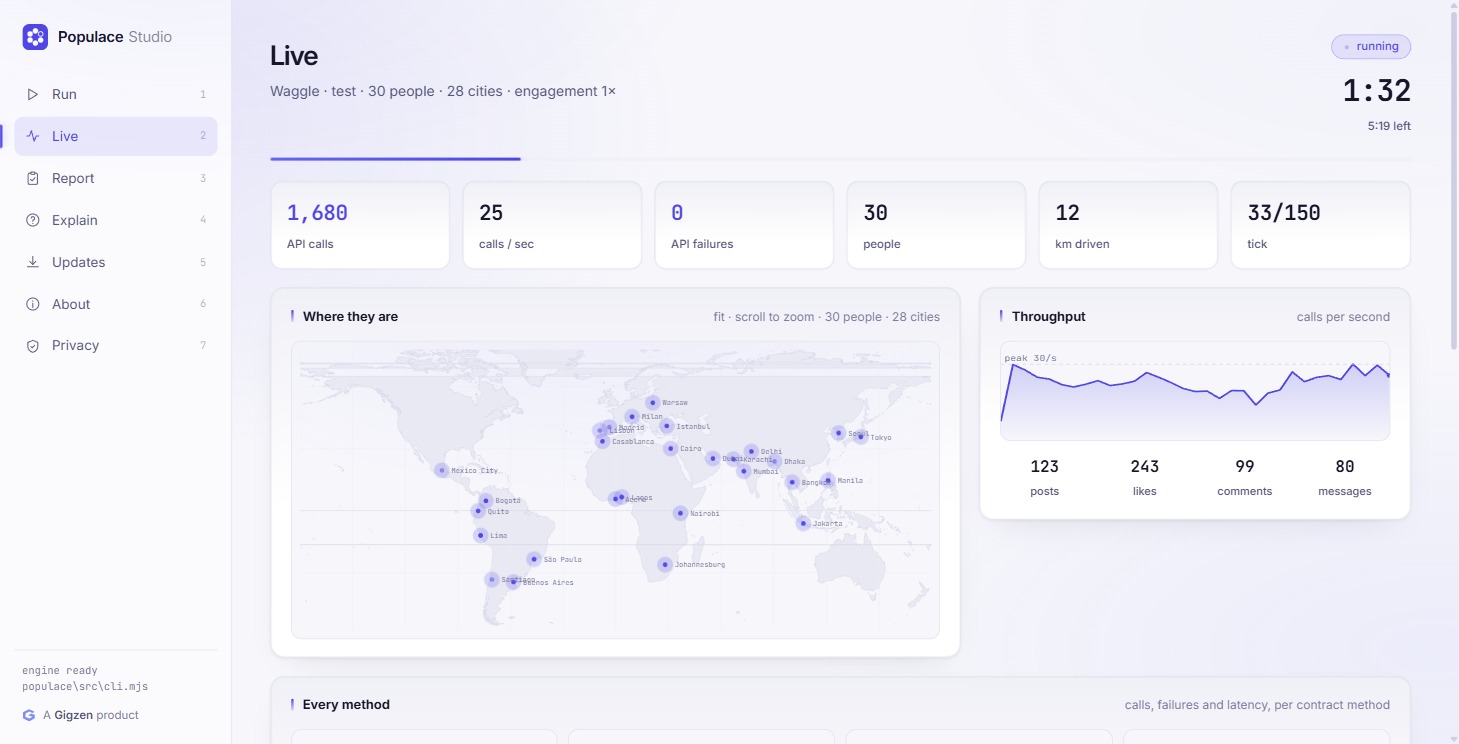
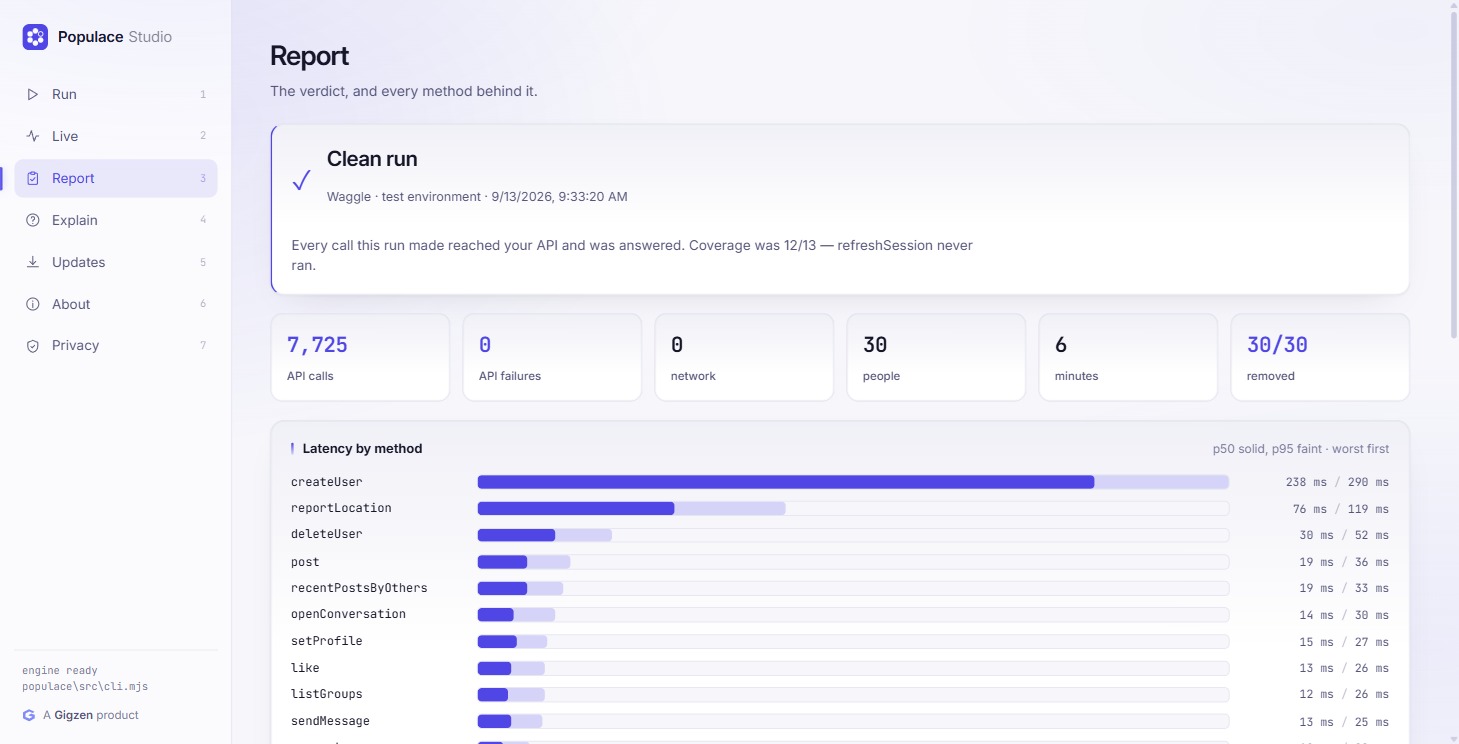
Start a run, watch it live on a map, read the verdict, ask what a failure
means, and check for updates. Under the hood it runs the same populace engine as the command line,
so both always agree.
Windows will warn you
Populace Studio is not code-signed yet, so Windows shows “Windows protected your PC.” Choose More info, then Run anyway. If you'd rather check the file first, the checksums are below.
# PowerShell: Get-FileHash .\PopulaceStudio-Setup-x64.exe
Setup 13ac4c30647f411451b776b3229d8b97e828702fa15367e7874229fafc877f03
Portable e01be494efa786cf1b8da247e5f01788c8dae8e4923c353b2f88d676c96b0967
Or use the command line
Needs Node 18 or newer, and nothing else: the engine has zero runtime dependencies. It runs on macOS and Linux too. The Windows app is Windows-only for now.
demo runs everything against a built-in app with a
bug planted in it, so you see a real report before writing any adapter code.
# from npm
npm install -g @gigzen/populace

# see it work against a fake app, no setup
populace demo

# point it at your own app
populace init
populace doctor
populace smoke
populace run --agents 6 --minutes 5
Download a ZIP
No git needed. Get
populace-main.zip, unzip it,
then run node src/cli.mjs demo.
From source
git clone https://github.com/Shakhtar-Sankur/populace.git, then
node src/cli.mjs demo. No install.
Get the right package
It's @gigzen/populace. A different package called
populace exists and isn't this.
PowerShell
A ready-made runner ships in examples/waggle/run-test.ps1.
Commands and configuration
| Command | What it does |
|---|---|
populace demo | Run everything against a built-in app, no setup |
populace init | Create a config and a starter adapter |
populace doctor | Check config, connection and coverage without running |
populace smoke | One person, every method once, in seconds |
populace run | Run the population |
populace explain | Explain the failures in the last report |
populace clean | Delete every account a run created |
populace report | Reopen the report from an earlier run |
populace update | Check npm for a newer version |
populace version | Version and environment, for bug reports |
populace.config.mjs
export default {
  app: "My App",
  adapter: "./adapters/my-app.mjs",

  // Must be a non-production environment. Populace checks.
  environment: "test",

  // Your production hosts. Never run against,
  // however the URL is written.
  neverRunAgainst: ["https://api.myapp.com"],

  // Reliability settings
  timeoutMs:   20000,  // give up waiting on one call
  retries:     3,      // extra tries for calls that never landed
  giveUpAfter: 12,     // unreachable calls before stopping

  population: { agents: 8, cities: ["manila", "mumbai"], minutes: 10 },
}
Use it from CI
import { simulate } from "@gigzen/populace";

const report = await simulate({
  configPath: "./populace.config.mjs",
});

if (report.verdict.status !== "clean") {
  process.exit(1);
}
What it won't tell you
Whether people want your product. Simulated people follow patterns. They won't surprise you like real customers, and they can't tell you your onboarding is confusing or your pricing is wrong.
Use Populace to prove your app works. Use real people to decide what to build.
Populace is a Gigzen product
Full name · Gigzen Populace
Gigzen is a software company in Bhubaneswar, India. We built Populace because we needed it: our own app passed a full manual test and still couldn't create a working account.